Medical record retrieval, as an API
One authorization in, complete record out. Create a case, request records from any US provider, get a webhook on every status change, and download structured documents into your product or agent.

# 1. Create the case the records belong to
curl -X POST https://enterprise.tavrn.ai/v2/cases \
  -H "Authorization: Bearer $TAVRN_API_KEY" \
  -H "Content-Type: application/json" \
  -d '{ "title": "Doe v. Example Motors", "client_name": "Jane Doe",
        "client_date_of_birth": "1980-01-15" }'

# 2. Upload the signed HIPAA authorization: get a presigned URL, then PUT the PDF to it
curl -X POST https://enterprise.tavrn.ai/v2/cases/{case_id}/sign-upload \
  -H "Authorization: Bearer $TAVRN_API_KEY" \
  -H "Content-Type: application/json" \
  -d '{ "file_name": "jane_doe_hipaa.pdf", "file_type": "application/pdf",
        "purpose": "retrieval_attachment" }'
# → { "upload_id": "...", "upload_url": "https://…", "expires_at": "..." }
curl -X PUT "{upload_url}" -H "Content-Type: application/pdf" --upload-file jane_doe_hipaa.pdf

# 3. Request records from one provider, with the signed authorization attached
curl -X POST https://enterprise.tavrn.ai/v2/cases/{case_id}/retrieval-requests \
  -H "Authorization: Bearer $TAVRN_API_KEY" \
  -H "Content-Type: application/json" \
  -d '{
    "patient":  { "name": "Jane Doe", "date_of_birth": "1980-01-15" },
    "facility": { "name": "Example Medical Center", "address_line1": "100 Main St",
                  "city": "Los Angeles", "state": "CA", "zip_code": "90001" },
    "requested_records": [ { "type": "medical_records" }, { "type": "billings" } ],
    "auth_form": { "upload_id": "{upload_id}", "file_name": "jane_doe_hipaa.pdf" }
  }'

# → { "id": "...", "order_number": "...", "status": "received" }
import { readFile } from 'node:fs/promises';
const base = 'https://enterprise.tavrn.ai/v2';
const headers = {
Authorization: `Bearer ${process.env.TAVRN_API_KEY}`,
'Content-Type': 'application/json',
};
// 1. Create the case the records belong to
const kase = await fetch(`${base}/cases`, {
method: 'POST',
headers,
body: JSON.stringify({ title: 'Doe v. Example Motors', client_name: 'Jane Doe' }),
}).then((r) => r.json());
// 2. Upload the signed HIPAA authorization: get a presigned URL, then PUT the PDF to it
const { upload_id, upload_url } = await fetch(`${base}/cases/${kase.id}/sign-upload`, {
method: 'POST',
headers,
body: JSON.stringify({ file_name: 'jane_doe_hipaa.pdf', file_type: 'application/pdf',
purpose: 'retrieval_attachment' }),
}).then((r) => r.json());
await fetch(upload_url, {
method: 'PUT',
headers: { 'Content-Type': 'application/pdf' },
body: await readFile('jane_doe_hipaa.pdf'),
});
// 3. Request records from one provider, with the signed authorization attached
const request = await fetch(`${base}/cases/${kase.id}/retrieval-requests`, {
method: 'POST',
headers,
body: JSON.stringify({
patient: { name: 'Jane Doe', date_of_birth: '1980-01-15' },
facility: { name: 'Example Medical Center', address_line1: '100 Main St',
city: 'Los Angeles', state: 'CA', zip_code: '90001' },
requested_records: [{ type: 'medical_records' }, { type: 'billings' }],
auth_form: { upload_id, file_name: 'jane_doe_hipaa.pdf' },
}),
}).then((r) => r.json());
console.log(request.status); // "received"import os, requests
base = "https://enterprise.tavrn.ai/v2"
headers = {"Authorization": f"Bearer {os.environ['TAVRN_API_KEY']}"}
# 1. Create the case the records belong to
case = requests.post(f"{base}/cases", headers=headers, json={
"title": "Doe v. Example Motors", "client_name": "Jane Doe",
}).json()
# 2. Upload the signed HIPAA authorization: get a presigned URL, then PUT the PDF to it
upload = requests.post(f"{base}/cases/{case['id']}/sign-upload", headers=headers, json={
"file_name": "jane_doe_hipaa.pdf", "file_type": "application/pdf",
"purpose": "retrieval_attachment",
}).json()
with open("jane_doe_hipaa.pdf", "rb") as pdf:
requests.put(upload["upload_url"], data=pdf, headers={"Content-Type": "application/pdf"})
# 3. Request records from one provider, with the signed authorization attached
request = requests.post(f"{base}/cases/{case['id']}/retrieval-requests", headers=headers, json={
"patient": {"name": "Jane Doe", "date_of_birth": "1980-01-15"},
"facility": {"name": "Example Medical Center", "address_line1": "100 Main St",
"city": "Los Angeles", "state": "CA", "zip_code": "90001"},
"requested_records": [{"type": "medical_records"}, {"type": "billings"}],
"auth_form": {"upload_id": upload["upload_id"], "file_name": "jane_doe_hipaa.pdf"},
}).json()
print(request["status"]) # "received"Base URL https://enterprise.tavrn.ai · Bearer API key · JSON · API reference · OpenAPI. Testing with a sandbox key? Run the same calls against https://sandbox.tavrn.ai/v2 — each host rejects the other’s keys.
From first call to production
Five steps, two of them human.
Test keys are self-serve: sign up at sandbox.tavrn.ai with a work email and get a tavrn_sk_test_ key for synthetic data in a minute. Production keys are issued to customer organizations in the Tavrn dashboard after a 30-minute call.
- 01
Try the sandbox
Sign up at sandbox.tavrn.ai with a work email and get a tavrn_sk_test_ key: the same v2 contract on synthetic facilities and patients, with scenario headers to force each outcome. No call, no PHI.
- 02
Book a call
30 minutes with the team: your use case, volumes, and the BAA. An agent can book it for you.
- 03
Get a key
Your organization is set up in the Tavrn dashboard and an admin creates a tavrn_sk_live key.
- 04
Upload the authorization
Request a presigned upload for the signed HIPAA authorization, then create the case and the retrieval request.
- 05
Receive records
A webhook fires on every status change (or poll the request), then list and download the documents.
Get complete records without waiting weeks.
POST /v2/cases/{case_id}/retrieval-requests
- Create a case, then request records with the patient’s signed authorization attached
- One patient authorization covers every provider
- A webhook fires on every status change
- Structured records and metadata arrive ready for your pipeline or agent
Retrieval as an endpoint for your product or agent
REST API: a webhook fires on every status change. Plain JSON, SDK-free, documented.
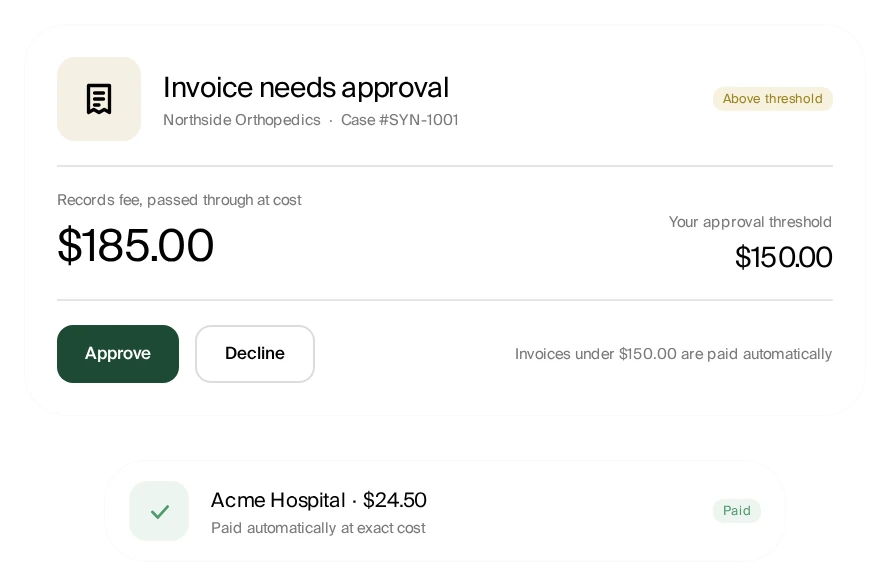
Fees you can see and control
Provider fees passed through at exact cost, under an approval threshold you set.
Automated follow-up
Every open request is followed up automatically every 48 hours.
Missing records agent
Checks every delivery against the request and goes back to the provider for anything missing.
Live status on every provider
Per-provider status, provider-stated dates, and full history on every request
Enterprise API v2
Four resources. Plain REST.
Every record request lives under a case. Statuses are coarse and public; documents are downloaded with the same key.
| Resource | Method | Path | Returns |
|---|---|---|---|
| Cases | POST | /v2/cases | A case to attach retrieval requests and documents to |
| Cases | POST | /v2/cases/{case_id}/sign-upload | Presigned URL for the authorization PDF or attachments |
| Retrieval requests | POST | /v2/cases/{case_id}/retrieval-requests | id, order_number, status |
| Retrieval requests | GET | /v2/retrieval-requests/{id} | Status, timeline, action requests |
| Retrieval requests | POST | /v2/retrieval-requests/{id}/action-response | Answer a question from the team |
| Documents | GET | /v2/retrieval-requests/{id}/documents | Retrieved files, each with a download URL |
| Webhooks | POST | /v2/webhooks | Signed deliveries on every status change |
Request status
- received
- Accepted; the team is validating the authorization and provider.
- processing
- Being worked with the provider; follow-ups every 48 hours.
- action_required
- Tavrn needs something from you — answer via the action-response endpoint.
- completed
- Terminal. Documents are ready to list and download.
- cancelled
- Terminal. Cancelled by you or because the provider cannot fulfil it.
Building with an AI agent?
agents.md; it explains what Tavrn does, what needs a human, and how to book the call on your behalf.- /agents.md
- instructions for an agent acting for a user
- /llms.txt
- index of this site for LLMs
- openapi.json
- Enterprise API v2 specification
- sandbox.tavrn.ai
- self-serve test key, synthetic data only
- API reference
- guides: retrieval, uploads, webhooks, errors
Read https://www.tavrn.ai/agents.md. I need medical records retrieved from US healthcare providers for <use case>. Explain what Tavrn does, what my organization has to do (authorization, BAA, API key), and book a 30-minute call with the Tavrn team for me.FAQ
FAQ
What customers say
“It is delivering results in record time — faster than we could ever obtain them ourselves. It is literally saving our staff hours of waiting on hold and chasing down updates. By reclaiming those lost work hours, Tavrn is more than paying for itself.”
John T. Briggs, Owner & Managing Attorney, Kellum Law Firm “Since implementing Tavrn, we’ve moved more cases into the demand stage over the last 3–4 months than we averaged each month throughout 2025.”
Matthew Bonilla, Director of Business Operations, Trust Guss Injury Lawyers “Since implementing Tavrn, my filings are up almost 65% year-over-year because I can personally handle way more cases.”
Martay Law Office “Tavrn gives us a faster, more streamlined approach to medical record retrieval so we can move cases quickly, reduce friction for clients, and build a scalable foundation for growth.”
Desert Injury Law